
What Reorder PDF Pages does — and when to use it
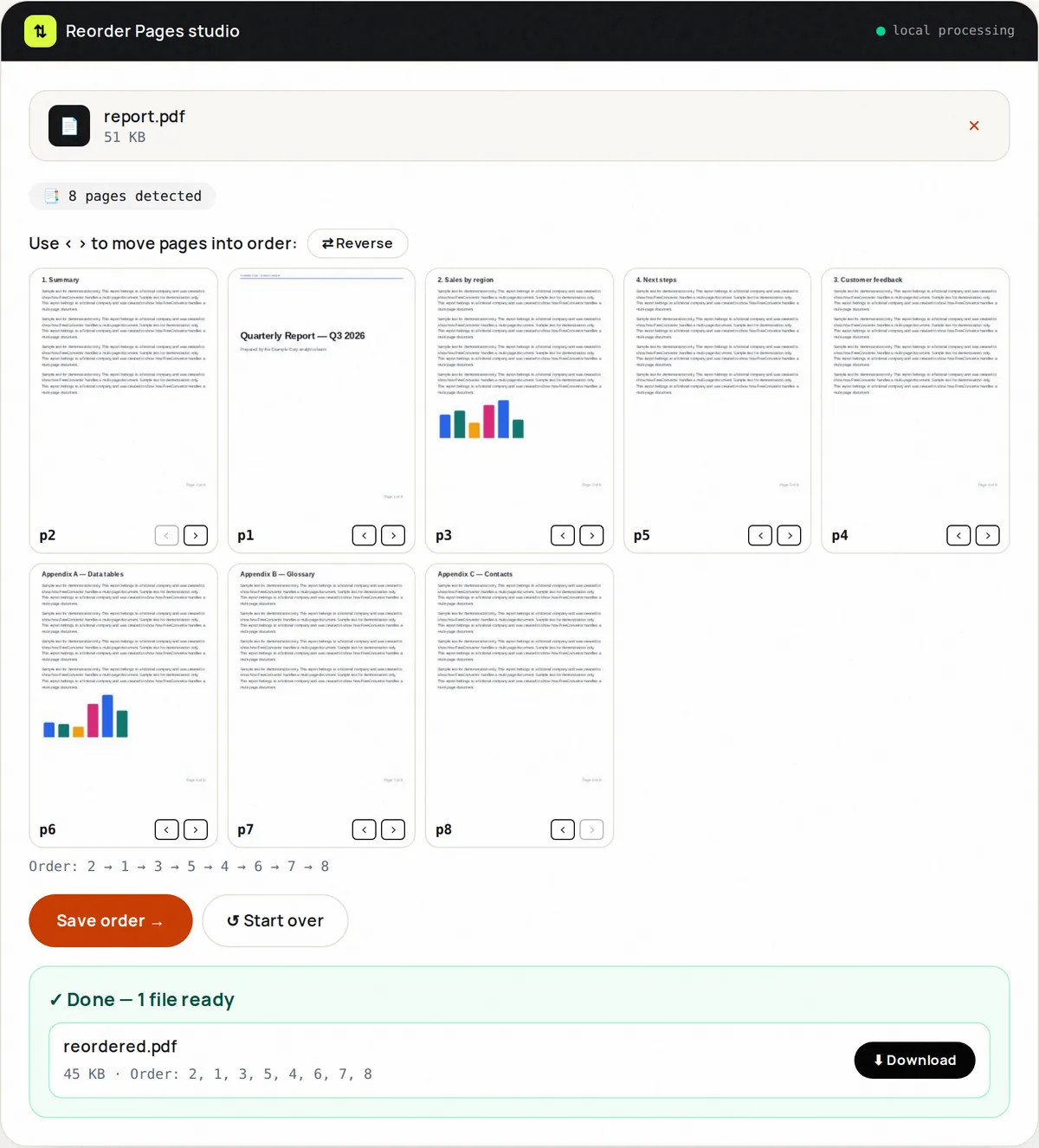
Pages in the wrong order make even great documents feel broken: a scan fed backwards, slides exported out of sequence, a contract with annexes shuffled. Reorder PDF Pages shows your pages as thumbnails with move buttons so you fix the order visually — move a page earlier or later, or reverse a backwards stack in one click.
The ‹ › buttons work with mouse, touch and keyboard. A line under the grid shows the current sequence as numbers, and saving rebuilds the PDF in exactly that order without re-rendering the pages.
For big jobs, pair with Split (isolate the messy section), reorder the slice, then Merge it back — a pro workflow that tames 500-page chaos.
How to use Reorder PDF Pages, step by step
- Upload one PDF. Thumbnails render with page numbers.
- Use the ‹ › buttons on each card to move pages earlier or later.
- Watch the order strip (e.g. 3,1,2,4…) update live.
- Click Save order and download the rebuilt PDF.
- Verify flow, then reset for the next file.
Supported formats & limits
- Input: PDF up to 100 MB
- Interaction: move buttons (mouse, touch, keyboard) and a Reverse button; thumbnails for the first 40 pages
- Output: single PDF in your exact sequence
- Messy sections? Split → reorder → Merge
Key features
Visual sorter
Thumbnails beat page numbers for spotting misplacements.
Keyboard accessible
Every move button can be reached and pressed from the keyboard.
Live sequence strip
The numeric order is always visible and copyable.
Lossless rebuild
Pages are copied, not rasterized.
Reverse helper
One click flips a backwards scan.
Private
Order fixing happens on-device.
Privacy promise
Your files never leave this tab.
This tool processes your file with JavaScript libraries (pdf-lib, pdf.js, Canvas) running in your own browser. The file is not sent to our server, and nothing is kept after you close or reset the page. That makes it a sensible choice for contracts, IDs and other private documents.
Common use cases
Backwards scans
Reverse a stack fed wrong-way into the feeder.
Slide fixes
Rescue decks exported out of order.
Contracts
Put annexes back where the TOC says they belong.
Photo books
Sequence a JPG-to-PDF album after building.
Theses
Move appendices without re-exporting from Word.
Tips for best results
- Use Reverse first for backwards stacks, then tweak strays.
- Zoom thumbnails to tell near-identical pages apart.
- Reorder before compressing — one optimization pass at the end.
- For 200+ pages, split into chapters, reorder each, merge back.
- Read the order strip aloud once — catches transpositions.
Common mistakes to avoid
- Not checking the order line before saving — read it once to catch swapped pages.
- Reordering an encrypted file — unlock first.
- Forgetting to download before resetting.
- Trying to reorder pages across different PDFs — merge first, then reorder.
Learn more
- How to merge, split and reorganize PDF pages without losing quality — When to merge, split, extract, delete, reorder or rotate PDF pages for application packs, reports and scans — without losing text quality.
Frequently asked questions
+How do I rearrange PDF pages?
Upload, move pages with the ‹ › buttons, click Save order, download.
+Can I reverse all pages at once?
Yes — the Reverse button flips the entire sequence instantly.
+Can I use it without a mouse?
Yes — each card has move buttons you can reach with Tab and press with Enter or Space.
+Will quality change?
No — pages are copied losslessly into the new order.
+Can I reorder pages from multiple PDFs?
Merge them first, then reorder the combined file.
+How many pages can I sort?
Any number, but thumbnails are shown for the first 40 pages; later pages appear as numbered cards. For very long documents, split, reorder the section and merge back.