
What Favicon Generator does — and when to use it
A favicon is 16 pixels that carry your whole brand into tabs, bookmarks and phones — and browsers and phones want a whole family: a 16/32/48 px ICO, a 180 px Apple touch icon and 192/512 px icons for Android and installable web apps, plus a manifest. Favicon Generator builds the entire kit from one logo in seconds.
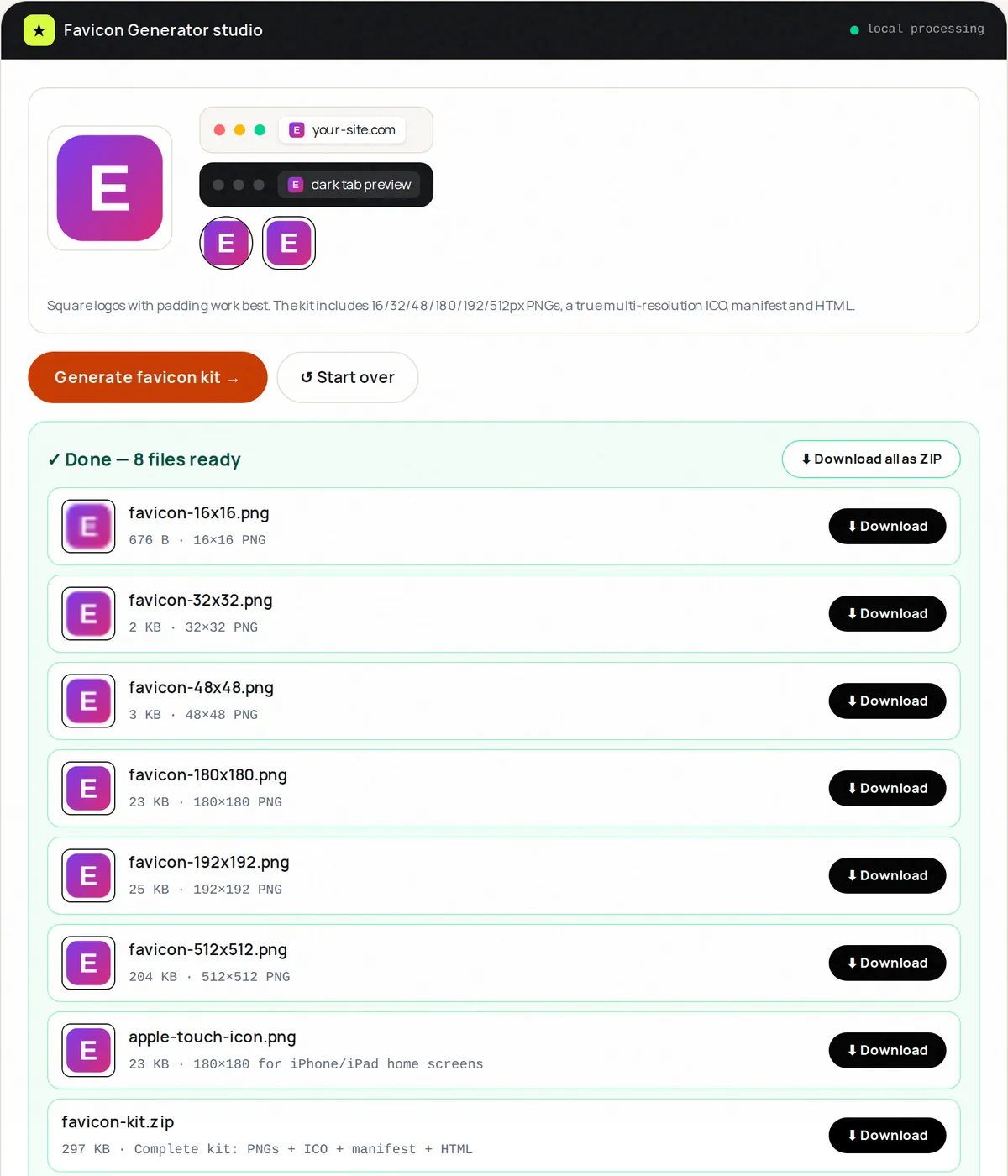
Upload a square-ish logo (PNG with transparency ideal), preview it in light and dark browser tabs and in round and rounded-square masks, then download a ZIP with every PNG, a multi-resolution favicon.ico, an apple-touch-icon.png, site.webmanifest and copy-paste HTML. Non-square images are centre-cropped to a square.
The ICO file genuinely contains 16, 32 and 48 px images — it is not a renamed PNG. The included install notes explain where to put the files and which tags to paste into your page.
How to use Favicon Generator, step by step
- Upload one logo (PNG, JPG, WebP or SVG; square works best).
- Check the previews in light and dark tabs and in round masks.
- Click Generate kit.
- Download the ZIP: PNGs, favicon.ico, apple-touch-icon.png, manifest and HTML.
- Copy the files to your site's root folder and paste the tags into <head>.
Supported formats & limits
- Input: PNG (ideal), JPG, WebP or SVG — square, at least 512 px recommended
- Output ZIP: 16/32/48/180/192/512 px PNGs, multi-size favicon.ico, apple-touch-icon.png, site.webmanifest, HTML snippet
- Previews: light tab, dark tab, round and rounded-square masks
- Install notes included
Key features
Real multi-size ICO
favicon.ico contains 16, 32 and 48 px images.
Phone and app icons
180 px Apple touch icon plus 192 and 512 px manifest icons.
Previews
See your icon in light and dark tabs and round masks before downloading.
Copy-paste HTML
Link/manifest snippet ready for <head>.
Transparency kept
PNG icons keep transparency; the Apple touch icon gets a white background as iOS expects.
Zero upload
Unreleased logos stay on your machine.
Privacy promise
Your files never leave this tab.
This tool processes your file with JavaScript libraries (pdf-lib, pdf.js, Canvas) running in your own browser. The file is not sent to our server, and nothing is kept after you close or reset the page. That makes it a sensible choice for contracts, IDs and other private documents.
Common use cases
Launches
Ship day-one with crisp tabs everywhere.
Rebrands
Regenerate the family from the new mark.
Web apps
Manifest icons for Android home screens and installable apps.
Blogs
Retina tabs that look intentional.
Client work
A ZIP you can hand over with install notes.
Tips for best results
- Start from a square image of 512 px or more with some padding — tiny sources look soft.
- Simplify: favicons read at 16px; drop taglines and thin strokes.
- Test on dark tabs — add a light badge if the mark vanishes.
- Keep the manifest icons for installability scores.
- Version the filename (favicon-v2.ico) to bust cache on updates.
Common mistakes to avoid
- Uploading a wide banner as favicon — crop square first.
- Edge-to-edge art that clips in circular masks — pad 10%.
- Leaving out favicon.ico — many browsers and tools still request it automatically.
- Forgetting to clear cache when checking the new icon.
Learn more
- Favicon sizes and files you actually need — Which favicon files browsers, phones and Google Search use, the sizes that matter, the HTML to add, and how to design a legible 16 px icon.
Frequently asked questions
+How do I make a favicon from my logo?
Upload a square logo, preview tab mocks, Generate kit, unzip and paste the HTML snippet.
+What's inside the ZIP?
PNG icons at 16, 32, 48, 180, 192 and 512 px, a multi-size favicon.ico, apple-touch-icon.png, site.webmanifest, the HTML snippet and short install notes.
+Is the ICO real?
Yes — it is a genuine ICO file containing 16, 32 and 48 px images.
+What logo works best?
A square PNG of at least 512 px with some padding and simple shapes. SVG files work if your browser can display them.
+How do I install the favicon?
Copy the files to your site's root (for example the /public folder in many frameworks) and paste the link tags into the <head> of your pages. With a CMS such as WordPress, use its Site Icon setting with the 512 px PNG.
+Why does my old favicon still show?
Browsers cache aggressively — hard-refresh, test incognito, or bump the filename.